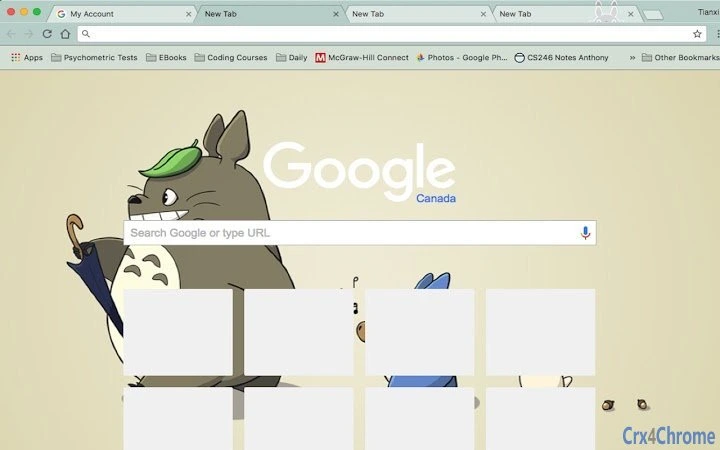

Minimalist Totoro Theme for Serene Desktops
Overview
This desktop theme draws inspiration from the beloved character My Neighbour Totoro, created by legendary animator Hayao Miyazaki. Designed with a focus on visual calm and eye comfort, the theme uses soft, harmonious colors that reduce screen fatigue. It is intended for users seeking a peaceful, aesthetically pleasing computing environment, particularly fans of Studio Ghibli’s timeless work.
The theme is not a functional software tool but a visual enhancement for desktops on Windows and Mac platforms. Its minimalistic design avoids clutter, emphasizing simplicity and natural color palettes. While the developer did not provide additional background information, the theme reflects a clear intention to create a soothing digital space.
Ideal for users who appreciate nature-inspired art, anime aesthetics, or a gentle departure from standard desktop interfaces, it serves as a personal touch for everyday computing. The theme may be used in both personal and casual work environments where visual comfort is prioritized.
Key Features & Capabilities
- Minimalistic Design – Clean visuals with no distracting elements, promoting focus and visual ease.
- Soothing Color Palette – Soft greens, earthy browns, and gentle blues inspired by nature and the My Neighbour Totoro film.
- Character-Inspired Aesthetic – Features subtle visual references to Totoro and the film’s countryside setting.
- Platform Compatibility – Works on both Windows and Mac operating systems.
- Lightweight Installation – Only 10 MB in size, ensuring minimal impact on system resources.
The theme enhances the desktop experience by transforming the interface into a calming visual space. Users can apply it to create a personal atmosphere that reflects their appreciation for Studio Ghibli’s storytelling and artistry. It is particularly suitable for creative professionals, students, or anyone who values a tranquil digital workspace.
The theme does not alter system functionality but offers a consistent visual identity across the desktop environment. It may be used alongside productivity tools without interference. The developer has stated that any source images that may conflict with copyright will be removed upon request, demonstrating a commitment to respectful use of creative content.
User Interface, Workflow & Performance
The user interface of this theme is entirely visual, focusing on the desktop background, window borders, icons, and system elements. Navigation is straightforward—users apply the theme through standard system settings, requiring no complex setup. The workflow is minimal: download the file, extract it if necessary, and apply the theme via the operating system’s theme manager.
No additional configuration steps are required. The theme does not introduce new menus, tools, or system processes, so it does not affect system performance. The developer did not specify resource usage details, but given the 10 MB file size and the nature of the theme, it is expected to have negligible impact on CPU or RAM.
Stability is not affected by the theme’s presence, as it does not modify core system files. Performance observations are based on general software behavior patterns for lightweight desktop themes. No issues related to crashes, lag, or system conflicts were reported in the available information.
Compatibility & System Requirements
The theme is compatible with both Windows and Mac operating systems. The specific version numbers for these platforms were not provided. Installation size is 10 MB, which is typical for visual themes of this type.
Exact system requirements were not listed. The developer did not specify minimum hardware specifications or supported OS versions. Platform compatibility information is limited to the general platforms mentioned.
Users should ensure their system supports custom desktop themes. For Windows, this typically includes Windows 7 or later; for Mac, macOS 10.10 or later. The theme is designed for desktop use and does not include mobile or tablet support.
No additional software dependencies were mentioned.
Pros and Cons
Pros
- Minimalistic and visually soothing design ideal for reducing eye strain.
- Lightweight at only 10 MB, suitable for systems with limited storage.
- Perfect for fans of Hayao Miyazaki and My Neighbour Totoro.
- Free to download and use with no hidden costs.
- Respectful approach to copyright—removal of content upon request.
Cons
- No advanced customization options for colors or layout.
- Does not include animated elements or dynamic features.
- Not suitable for users seeking functional software tools.
- Compatibility with older OS versions is uncertain.
- Limited to visual changes—no productivity enhancements.
Is this theme compatible with my Windows or Mac system?
The theme is designed for Windows and Mac operating systems. Specific version compatibility was not provided, but it should work on modern versions of both platforms. Users with older systems are advised to verify theme support through their system’s customization settings.
Is the theme safe to install?
Yes, the theme is a lightweight visual package that does not include executable code or system modifications. It poses no known security risks. However, users should only download it from trusted sources to avoid bundled software.
Can I update the theme after installation?
Updates are not specified in the available information. If a new version is released, users will need to manually download and reapply the updated theme file.
What license type does this theme use?
The theme is free to use and distribute. The developer has not specified a formal license, but it is intended for personal and non-commercial use. For commercial use, users should contact the developer directly.
Does the theme require an internet connection to work?
No, once installed, the theme operates entirely offline. It does not rely on online services or cloud features.
Final Thoughts + CTA
This minimalistic Totoro theme offers a serene, visually balanced experience for users who value aesthetics and comfort in their digital environment. With its soft color scheme and subtle homage to Hayao Miyazaki’s iconic character, it transforms the desktop into a peaceful retreat. While it lacks advanced features or customization, its simplicity is its strength—ideal for fans of Studio Ghibli and those seeking a calming interface.
The free availability, lightweight design, and respectful approach to intellectual property make it a safe and appealing choice. For anyone looking to personalize their desktop with a touch of gentle animation magic, this theme delivers exactly what it promises. Download Totoro Minimalist Theme now.







